API Authentication Services
(/api/authenticate/)
Last updated 12/10/2020
Please provide any feedback to [Link Redacted]
Detailed documentation for the Partner API Services is available in the associated section in eServiceCentral.
To view the services for a particular API, choose “Providers -> View Services,” and then choose the appropriate API from the Provider drop-down.
Unlike other services that are specific to a given Partner API, the Authentication Service is used in common by all Partner APIs. The Authentication Services use the /authenticate/ endpoint to manage access requests:
Authentication services allow a user to access a Partner API in order to view, manage, or report on information based on the user’s specific privileges.
This service uses POST to create an authentication token (authToken) and to expire that authentication token at the end of a session.
POST creates a new resource, generally under some parent resource.
In the Authentication service, POST is used either to create a new authentication token associated to a particular user via their userId, or to end a session and expire the token for that userId.
On successful creation, the API will return an HTTP status 201 and the value of the newly created authToken. On successfully ending a session and expiring the token, the API will return an HTTP status of 201.
Note: POST is neither safe nor idempotent. Making two identical POST requests will create two resources with identical information.
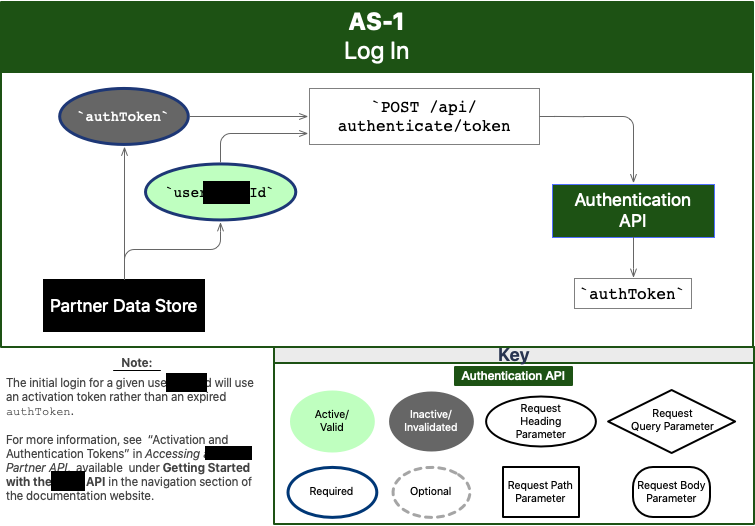
POST /api/authenticate/token requests and receives an auth token.
Sent Fields | Key Received Objects | Key Received Fields |
Activation Token OR Expired authToken | NA | Valid authToken |
userId | NA | NA |
The request must also include the Accept, Accept-Language, X-SoldTo, and X-ShipTo values.
The response will include the string that is the new authToken required to authenticate this new session.
Accept: application/json
Accept-Language: en-US
X-SoldTo: {{soldTo}} //The sold-to information relevant for this user.
X-ShipTo: {{shipTo}} //The ship-to information relevant for this user.
{
"authToken": "string", // the learner's prior authToken or, if no authToken is available, the user's activation token
"userId": "string" // the ID the learner uses to sign in
}
Success will result in a success status code of 201: the request has succeeded and the new resource has been created.
201
{
"authToken": "string" // the authToken the learner should use for the duration of this session
}
An authentication failure will receive something like the following in the response body under the “errors” list:
{
"code": "UNAUTHORIZED",
"message": "You are not authorized."
}
Failure will result in a failure status code. The specific code will provide more information about this issue; for example, that a required parameter is missing or did not match the expectation. For more information on status codes, please see your preferred HTTP response code reference or RESTful API reference.
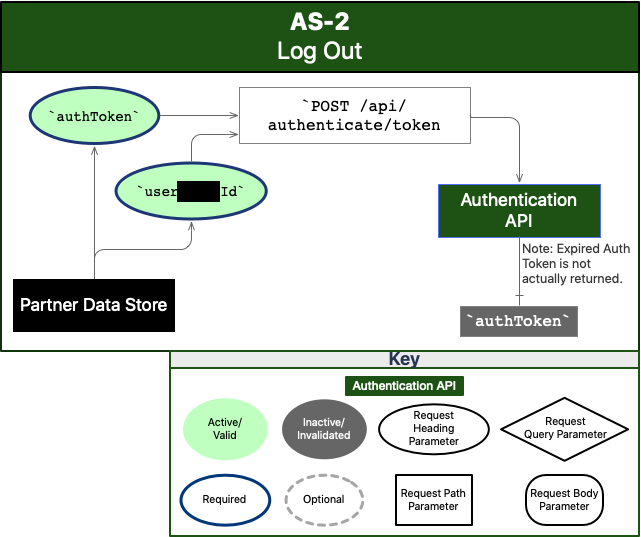
POST /api/authenticate/end-session expires an auth token.
Sent Fields | Key Received Objects | Key Received Fields |
Valid authToken | NA | NA |
userId | NA | NA |
The request must also include the Accept, Accept-Language, X-SoldTo, and X-ShipTo values.
The response will include the success or failure notification; success means that the authToken has been noted as invalid.
Note: X-Auth-Token in the request header and authToken in the request body will be the same value.
Accept: application/json
Accept-Language: en-US
X-SoldTo: {{soldTo}} // The sold-to information relevant for this user.
X-ShipTo: {{shipTo}} // The ship-to information relevant for this user.
Content-Type: text/plain // Or as chosen
X-Auth-Token: {{authToken}} // The authToken that has been most recently received for this user.
{
"authToken": "string", // the authToken for the session to be ended
"userId": "string" // the userAppleId associated with the session to be ended
}
200
Failure will result in a failure status code. The specific code will provide more information about this issue; for example, that a required parameter is missing or did not match the expectation. For more information on status codes, please see your preferred HTTP response code reference or RESTful API reference.